yepitran proves your mobile app works. It runs a short test on a real iOS Simulator and Android Emulator, records a video, and gives one verdict that you, your reviewers and your coding agent can trust. Free and open source.

pipx install yepitran

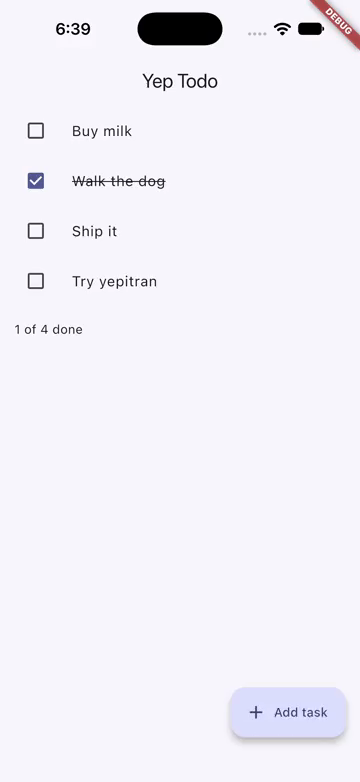
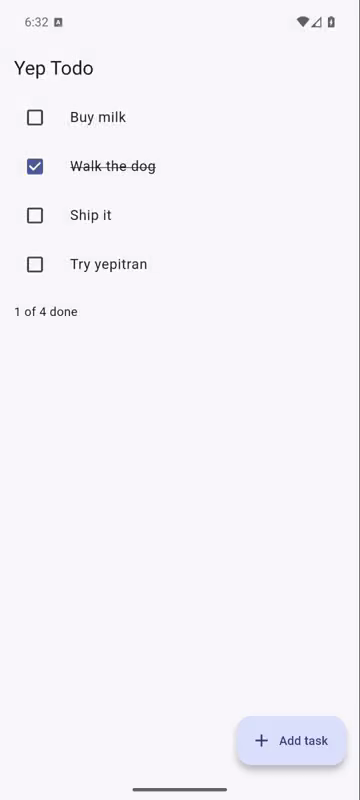
demo.proof on iOS and Android

A real run of the demo app, recorded by yepitran.

  1. launch
  2. wait "Yep Todo"
  3. assert visible "Buy milk"
  4. screenshot home
  5. tap "Walk the dog"
  6. assert visible "1 of 3 done"
  7. tap "Add task"
  8. wait "New task"
  9. type "Try yepitran" into "Task title"
  10. tap "Save"
  11. assert gone "New task"
  12. assert visible "Try yepitran"
  13. assert visible "1 of 4 done"
  14. screenshot task-added
Verdict
iOS Simulator
Android Emulator

“Tests pass” doesn’t mean the app works

A mobile change only proves itself on a phone, and most pull requests never get that far.

  • Reviewers can't see the screen.A diff doesn't show whether the button still works, or whether a sheet now covers it.
  • Coding agents say “done” without opening the app.They change screens they have never seen, and unit tests can't tell.
  • UI tests cry wolf.When an emulator hangs, most tools report a failed test, and people learn to ignore red builds.

yepitran opens the app on real simulators and emulators, does what a person would do, and posts the proof where the review happens.

Fix: new tasks don't save

Pull request #128

coding agent

Fixed the bug where new tasks didn't save. All 212 tests pass, ready for review.

reviewer

Did anyone open the app? This screen broke on Android last week.

yepitran
Last frame on iOS: the new task is in the list Last frame on Android: the new task is in the list

Passed on both platforms. Video and screenshots are attached to the run.

Made for people who ship mobile apps

Mobile developers

Check a fix on iOS and Android with one command before you ask for review. No test code goes into your app.

Reviewers and teams

Watch the change work in a video on the pull request, instead of checking out the branch and booting a simulator yourself.

Coding agents

Claude Code, Codex and similar agents write the scenario, run it, and read a verdict they can act on: an exit code and verdict.json.

Works with any iOS Simulator build (.app) and any Android .apk. Point it at a Flutter project and it builds both for you. Runs on macOS, on Linux for Android, and in GitHub Actions.

How it works

Four steps, the same every time, so a result means the same thing on your laptop and in CI.

  1. You write the steps

    A short scenario in plain words: what a person taps, types and expects to see. Your agent can write it for you.

  2. It boots clean devices

    Its own iPhone simulator and Android emulator, freshly booted, with your app newly installed. It never touches another session's device.

  3. It follows the script and records

    Every tap, every typed word read back, every check. The whole run is on video, with screenshots where you asked.

  4. You get one verdict

    PASS, APP FAIL or INFRA FAIL, with a report folder. If the device broke, it retries on a fresh one before it blames your app.

A flaky emulator is never your app's fault

Every attempt starts on a cleanly booted device. A failure counts against your app only when it happens again on a fresh one. Pick what goes wrong and see what yepitran decides.

Run report

Android, demo.proof

  1. Attempt 1, freshly booted emulatorThe emulator stopped responding at step 9.
  2. Attempt 2, after a cold bootAll 14 steps passed.

The hiccup is in the report. Your app isn't blamed for it.

Write the test the way you'd say it

One step per line, matched against what a person sees on the screen. Nothing to add to your app, and no selectors to keep up to date.

  • Taps land where a finger would.yepitran taps the part of a button that nothing else covers, so sheets and overlays can't steal the tap.
  • Typing is read back.After every entry it checks the field, so autocorrect or a slow keyboard can't quietly change your text.
# add-task.proof
launch
wait "Yep Todo"
tap "Add task"
type "Try yepitran" into "Task title"
tap "Save"
assert gone "New task"
assert visible "Try yepitran"
screenshot task-added

$ yepitran Runner.app app.apk add-task.proof
PASS  ios: all 8 steps passed
PASS  android: all 8 steps passed

Proof on every pull request

The GitHub Action runs your scenario on GitHub's own runners, iOS on macOS and Android on Linux. It uploads the video and screenshots and can post the verdict on the pull request.

The check fails only when the verdict isn't PASS. GitHub's runners are free for public repositories.

# .github/workflows/proof.yml
- uses: codenameakshay/yepitran@v0
  with:
    platform: ios
    app: build/ios/iphonesimulator/Runner.app
    scenario: .yepitran/smoke.proof
    comment: true